Alberta homeowner guide
There is no single thermostat schedule that fits every geothermal system. Equipment staging, supplemental heat, controls and the home’s response all matter. Start with the installer-approved settings, then make modest, deliberate changes while watching comfort and system behaviour.
Discuss your projectKnow which system your thermostat controls
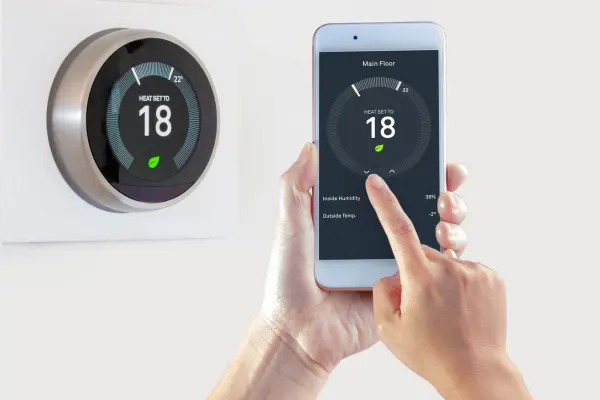
A forced-air geothermal heat pump, a hydronic radiant system and a multi-zone installation can respond differently to the same temperature change. Before adjusting the schedule, identify your thermostat model, equipment type and the modes configured during commissioning.
Ask the installer to explain the normal heating stages and any auxiliary heat indication. A screen label may show a heating demand rather than precisely how much electricity is being used. Do not assume every stage has the same efficiency or that every smart thermostat supports the full capabilities of the heat pump.
Keep the manufacturer’s user instructions nearby. Controls that appear similar may use different recovery logic or staging. If the thermostat was replaced after the system was installed, have compatibility and configuration checked before attributing high bills to the heat pump.
Understand why a large setback may activate backup heat
Lowering the indoor temperature reduces heat loss while the home is cooler. However, recovering from a large setback can create a heating demand that exceeds what the heat pump can supply quickly. In some systems, electric resistance heat then helps restore the setpoint.
Natural Resources Canada explains this recovery effect. It is a reason to evaluate the entire schedule, rather than assuming that a furnace-style overnight setback will produce the same result with a heat pump.
A steady setpoint can be a useful starting point, especially when the system has slow response or backup heat frequently enters during recovery. Modest setbacks may work with suitable controls and equipment. Ask for a schedule appropriate to your installation and avoid broad claims that all setbacks save money or that none do.
Match schedules to radiant floors and forced air
Radiant floors store heat and can respond slowly. A sharp temperature change may take time to appear in the rooms because the floor mass continues releasing or absorbing heat. Repeatedly raising the thermostat can create overshoot later without speeding the floor’s immediate response.
Forced-air systems often respond faster, but recovery still depends on available heat pump capacity, airflow and the building’s heat loss. Keep supply and return grilles clear and use the approved filter type. A thermostat cannot solve an airflow restriction or an undersized distribution path.
If different rooms need different temperatures, ask about balancing and zoning rather than simply increasing the whole-house setpoint. Our geothermal radiant floor guide explains the importance of matching water temperatures and controls to the heating design.
Treat auxiliary and emergency heat as different questions
Auxiliary heat can be a normal part of a designed system under particular loads or recovery conditions. Frequent unexpected operation is worth investigating, but its presence does not automatically mean the geothermal system has failed.
An emergency heat mode, where available, may change which equipment operates. Use it according to the manufacturer’s instructions and the installer’s guidance. Switching modes casually can bypass normal heat pump operation and increase electricity use.
Do not disable protective controls or backup heat to chase a lower bill. Instead, record when the indication appears, the outdoor conditions, indoor setpoint and any recent schedule changes. This gives a technician useful information for checking settings, capacity and system performance. Our cold-weather guide provides the wider design context.
Make one change and keep a useful record
| Record | Why it helps |
|---|---|
| Schedule and setpoint | Shows whether recovery follows a large temperature change |
| Room comfort | Identifies uneven heating or slow response |
| Auxiliary indication | Helps identify a pattern to discuss with the installer |
| Weather and occupancy | Adds context for changes in heating demand |
| Electricity use | Supports comparison without relying only on the dollar bill |
Change one user setting at a time and leave enough time to observe the effect. Compare similar conditions where possible. A colder week or a different electricity rate can obscure the effect of a schedule change. A thermostat runtime report is useful context, but it is not necessarily a calibrated energy meter.
Know when settings need a service visit
Contact a qualified technician if the home cannot maintain temperature, faults recur, unusual noise develops or auxiliary heat operates in a way that differs from the commissioned plan. Write down the exact fault message and the circumstances rather than repeatedly resetting the equipment.
For a home that will be vacant, ask for a safe temperature and monitoring plan that protects plumbing and suits the system. Do not shut off necessary freeze protection or assume a smart thermostat will remain connected during a power or internet outage.
The maintenance and lifespan guide explains what belongs in a service review. Contact Envirotech for help interpreting your controls or checking how the installation is operating.
Common questions
What is the best geothermal temperature setting?
Choose a comfortable setting within the user instructions and installer guidance. There is no universal setpoint or schedule that guarantees lowest cost.
Should I lower the temperature overnight?
It depends on recovery controls, response time and backup heat. Start with the commissioned schedule and ask about modest adjustments.
Does auxiliary heat always mean a fault?
No. It may be part of normal designed operation. Unexpected or persistent use deserves a service review.
Continue your research
Explore the Alberta geothermal learning centre for connected guides on design, comfort, installation and costs.
Plan with Envirotech Geothermal
Bring your property details, existing equipment information and questions to a discussion with the Envirotech team.
Contact EnvirotechExplore residential geothermalPrepared by Envirotech Geothermal Team. Technical or planning reference: Natural Resources Canada heat pump guide. Reviewed October 4, 2026.